
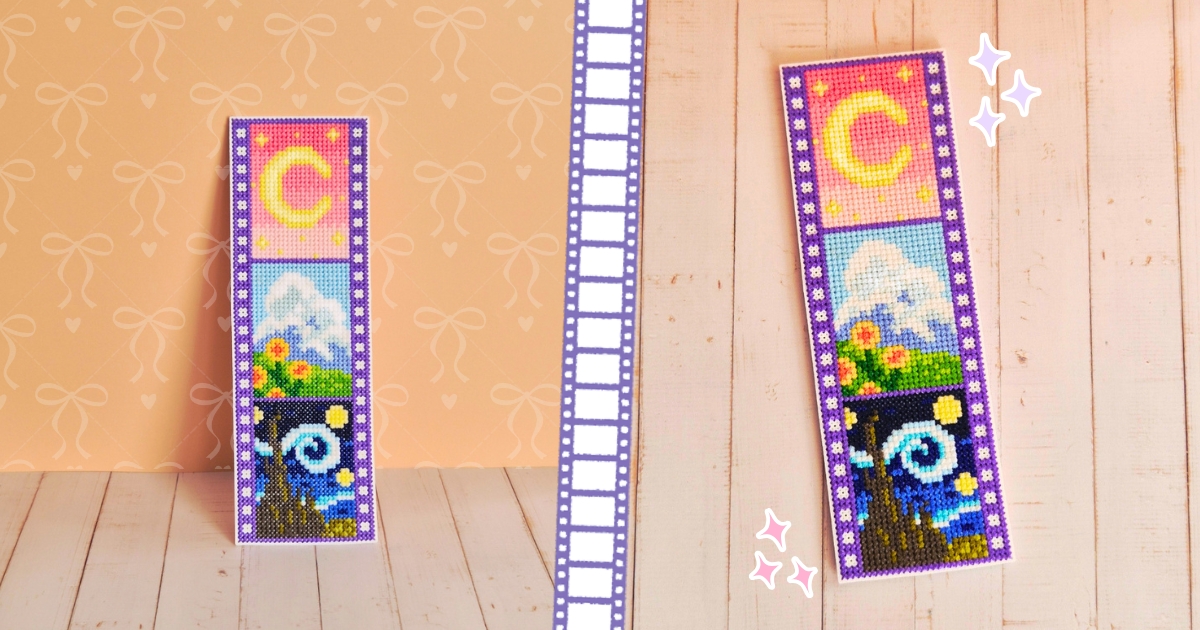
I recently finished this little Film Strip Cross Stitch Pattern, and it’s probably one of my favorite designs I’ve made so far! I wanted to make something inspired by the things I loved growing up, and the idea of putting them together in an old-fashioned film strip seemed fitting.
If you grew up watching Sailor Moon, you’ll probably recognize the inspiration behind the first frame, with its pink background, yellow crescent moon, and tiny stars. For the second frame, I went with a Studio Ghibli inspired landscape, because I’ve always loved those beautiful countryside scenes with their fluffy clouds, blue skies, and fields of flowers.
And finally, there’s Van Gogh’s The Starry Night. I remember being fascinated by this painting as a kid, especially those swirling skies. Recreating it in such a small cross stitch frame was a bit tricky, but I think it’s my favorite of the three!
I went with purple for the film strip border instead of the usual black, which I thought would look a little too harsh against the other colors. Plus, I’ve always loved pastels, so naturally I had to make the whole thing a little more colorful!
I actually have something planned for this little film strip, but I’ll share more about that when the time comes! In the meantime, you could turn yours into a cute bookmark, a little wall decoration, or use it to embellish another craft project.

What You’ll Need
- Cross stitch fabric or the 3D printable canvas I designed, which is included with the paid pattern.
- Embroidery floss 23 colors (DMC 30 – Blueberry Medium Light/ DMC 162 – Blue Water/ DMC 367 – Pistachio Green Dark/ DMC 445 – Lemon Light/ DMC 520 – Fern Green Dark/ DMC 522 – Fern Green/ DMC 602 – Cranberry Medium/ DMC 603 – Cranberry/ DMC 604 – Cranberry Light/ DMC 605 – Cranberry Very Light/ DMC 725 – Topaz Medium Light/ DMC 740 – Tangerine/ DMC 746 – Pearlescent Vanilla/ DMC 797 – Royal Blue/ DMC 800 – Pale Delft Blue/ DMC 820 – Royal Blue Very Dark/ DMC 823 – Navy Blue Dark/ DMC 844 – Beaver Gray Ultra Dark/ DMC 912 – Emerald Green Light/ DMC 3362 – Pine Green Dark/ DMC 3839 – Lavender Blue Medium/ DMC 3846 – Bright Turquoise Light/ DMC B5200 – Snow White)
- Cross stitch needle
- Scissors & Embroidery Hoop
- The cross stitch chart
- Backing material (optional)
How I Stitched It
I worked on this Film Strip cross stitch pattern design one frame at a time, starting from the top and making my way down. I did the same with the film strip border, stitching only the section around each scene as I went along instead of completing the whole border first.
The Starry Night frame took a little more patience with all those different shades of blue, but the other two were pretty straightforward. If you’re looking for an easy cross stitch pattern to work on at your own pace, breaking this one down into three smaller scenes makes it quite manageable.
Once you’ve finished stitching, you can add a backing to hide the threads on the reverse side if you’d like to turn it into a bookmark or display it on its own.

Free Film Strip Cross Stitch Pattern
You can stitch the entire Film Strip cross stitch pattern design for free using the interactive cross stitch chart below. Just click on the stitches as you complete them, and the tracker will save your progress automatically.
I know how annoying it can be to lose your place when working with lots of different colors, so I thought having a little tracker would come in handy.
If you enjoy collecting cute cross stitch patterns, feel free to give this one a try!
Dreamy Film Stitch Tracker
Follow the chart and keep track of every little stitch!


How to Use the Interactive Cross Stitch Tracker
You can follow the entire Film Strip cross stitch pattern for free using the interactive chart above. It also saves your progress automatically, so you won't have to remember where you left off!
Here's how it works:
- Highlight Row: Click this button to turn on the row highlight. The selected row will appear in yellow, making it easier to see where you're stitching. Click the button again to turn it off.
- Previous / Next: Move between rows using these buttons, or type a specific row number in the Row box. Make sure Highlight Row is turned on if you want to see the selected row highlighted.
- Mark Individual Stitches: Click directly on any square in the chart to mark it as completed. A checkmark will appear over it. Click the same square again to unmark it.
- Complete Row: Once you've finished stitching a whole row, click this button to mark all 30 stitches in that row as completed. You can then move on to the next row.
- Zoom In / Out: Use the + Zoom and − Zoom buttons to get a closer look at the chart. Click 100% to return to the original size.
- Stitch Opacity: Adjust the slider to change how faded your completed stitches appear.
- Show Grid: Turn this on to display grid lines over the chart.
- Undo: Made a mistake? Click Undo to reverse your last action.
- Reset Progress: Clears all your completed stitches and starts the tracker over. Be careful with this one!
Your progress is saved automatically in your browser, so you can come back later and continue stitching. Just make sure you're using the same browser and device, and don't clear your browser's site data.

Get the Printable PDF Pattern
If you prefer working from a printable chart, you can find the PDF version in my Ko-fi shop. It also includes a larger, zoomed-in version of the chart to make the stitches easier to see, along with an STL file of the custom cross stitch canvas I designed, so you can 3D print your own!
The interactive chart above is completely free to use, so you don't need to purchase the PDF unless you'd like the extra files.
Before You Go!
If you make your own film strip, I'd love to see it! Feel free to tag me on Instagram, Pinterest, Youtube or TikTok so I can have a look. You can also find me on Pinterest and YouTube, where I share my other crafty projects.
And if you enjoyed this one, you might also like my Fantasy Sword Cross Stitch Bookmark. The pattern is free on my blog too, and there's an interactive chart to help you keep track of your stitches.
Happy stitching!









0